Introduction
Since its introduction in late 2024, the Model Context Protocol (MCP) has rapidly gained traction among AI developers and researchers. MCP provides a standardized way for AI systems to access tools (or functions) through a common interface, dramatically improving modularity, tool sharing, and scalability across AI applications.
In this article, I’ll show you how to build your own MCP server using Spring AI, demonstrate how it integrates with Claude Desktop, and explain why adopting MCP in your tool ecosystem is a powerful move for any AI engineering team.
Why MCP Matters
Before MCP, developers often had to re-implement or duplicate the same tools across multiple AI applications. This fragmentation led to inconsistent behaviors, redundant effort, and increased maintenance overhead. MCP changes that by standardizing the way tools are defined and invoked, offering a consistent interface for AI systems to access external capabilities.
While MCP currently requires developers to download and run their own servers, it conceptually enables centralized tool management within a given organization or application. Instead of embedding tools within each individual AI agent, developers can host them behind an MCP server and expose them via standardized protocols. This separation allows developers to avoid bundling and duplicating logic across applications.
As a result, MCP provides a scalable architecture where tools can evolve independently of the AI agents that use them. It simplifies integration, reduces technical debt, and enhances reusability—especially in environments where multiple AI clients or agents need access to a shared set of capabilities.
Key benefits include:
- Improved re-usability: Tools implemented once can be shared across many agents.
- Centralized management: Versioning, access control, and monitoring of tool usage become easier.
- Increased developer productivity: AI developers can focus on core business logic while relying on shared tools.
- Enhanced scalability: More tools can be added without bloating the AI app footprint.
The Emergence of Hosted MCP Platforms
Although today’s MCP implementations are primarily self-hosted, there is growing momentum around hosted MCP server platforms that aim to simplify deployment and broaden access. Cloudflare, for example, now supports deploying remote MCP servers on its infrastructure, making them accessible over the internet with built-in support for authentication and secure communication. Atlassian has also introduced a hosted MCP server integrated with Jira and Confluence, allowing AI agents like Claude to interact with enterprise data without local setup. These emerging platforms point to a future where tool invocation via MCP could become as simple as connecting to a cloud API, accelerating adoption and enabling organizations to scale AI capabilities with minimal infrastructure overhead.
Getting Started: Available MCP Server Options
If you’re just exploring, there are already open-source MCP server implementations you can download and deploy:
These reference implementations support two official transport protocols:
- STDIO (Standard Input/Output): Ideal for local and lightweight tools.
- HTTP + SSE (Server-Sent Events): Suitable for remote or web-based AI agents.
Per the MCP specification, all compliant servers should support STDIO and may optionally support HTTP+SSE.
Creating Your Own MCP Server with Spring AI
First, you need to include a Spring AI dependency for MCP server.
 <dependency>
            <groupId>org.springframework.ai</groupId>
            <artifactId>spring-ai-starter-mcp-server</artifactId>
        </dependency>
Next, create a class annotated by Service or Component with tools that need to be called by AI as shown below. The below tool sends a Hello World message with a current local time.
package com.example.demo;
import org.springframework.ai.tool.annotation.Tool;
import org.springframework.stereotype.Service;
@Service
public class HelloWorldService {
    @Tool(
            name = "HelloWorld",
            description = "A tool to send a hello world message with the local current time"
    )
    public String getHelloWorld() {
        // Get the current time
        String currentTime = java.time.LocalDateTime.now().toString();
        return "Hello, World! at "+currentTime;
    }
}
Next, you need to MCP sever config class that returns ToolCallBack objects as shown below. This is needed to configure an MCP Server to offer HelloWorldService methods as tools.
import org.springframework.ai.support.ToolCallbacks;
import org.springframework.ai.tool.ToolCallback;
import org.springframework.context.annotation.Bean;
import org.springframework.context.annotation.Configuration;
import java.util.List;
@Configuration
public class McpServerConfig {
    @Bean
    List<ToolCallback> toolCallbacks(HelloWorldService helloWorldService) {
        return List.of(ToolCallbacks.from(helloWorldService));  //
    }
}
Lastly, you need ot disable logging to standard output or configure to go to log files or some log sink. In my code, I disabled the logging as shown below. And, since STDIO doesn’t require Tomcat, I turned off Tomcat.
spring.application.name=demo
spring.main.banner-mode=off
logging.level.root=ERROR
spring.main.web-application-type=none
That’s all the code you need! Once your MCP server implementation is complete, package it into a runnable JAR by executing either mvn package (for Maven) or gradlew build (for Gradle), depending on your project setup.
Integrating with Claude Desktop
Now, let’s connect your custom MCP server with Claude Desktop to enable seamless tool invocation.
Claude Desktop supports MCP integration through a configuration JSON file. Below is an example of how to register your custom Hello World MCP server. In addition to this, I’ve also created another MCP server named Tavily MCP, which uses Java and LangChain4j to perform real-time web searches. If you’d prefer not to build one yourself, Tavily provides a publicly available MCP-compatible server that you can use directly—simply download it from https://docs.tavily.com/documentation/mcp.
To integrate with Claude Desktop on Windows, place your configuration JSON in the following path, C:\Users\<YourUserName>\AppData\Roaming\Claude\claude_desktop_config.json

Once saved, restart Claude Desktop, and it will automatically detect and list the registered tools from your MCP server. This setup allows Claude to invoke your tools just like native functions, enabling dynamic, external tool usage powered by your server. After the Claude Desktop app gets restarted, you can see the MCP servers integrated as shown below.
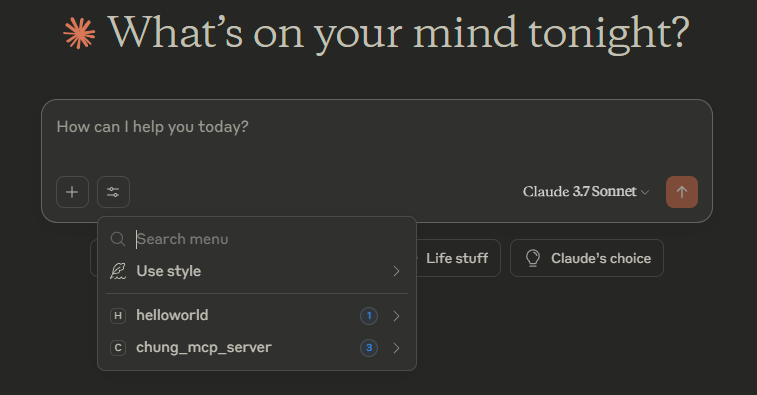
Since Hello World MCP server is integrated, when I ask for Hello World message, it responses Hello World with the local current time.

Let’s test if my local Claude app can do web searches.
I turned off the chung_mcp_server, which is my custom Tavily MCP server.
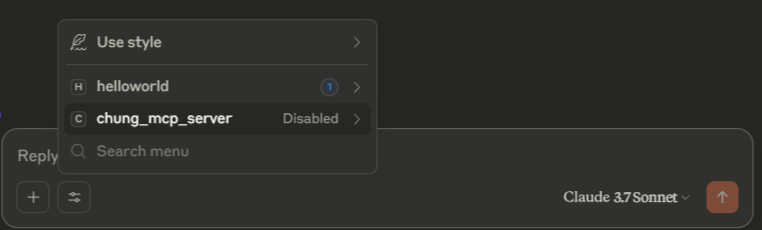
When I ask for the most current new about Trump, it says, “I don’t have specific details about his presidency or current new as of May 17, 2025.”
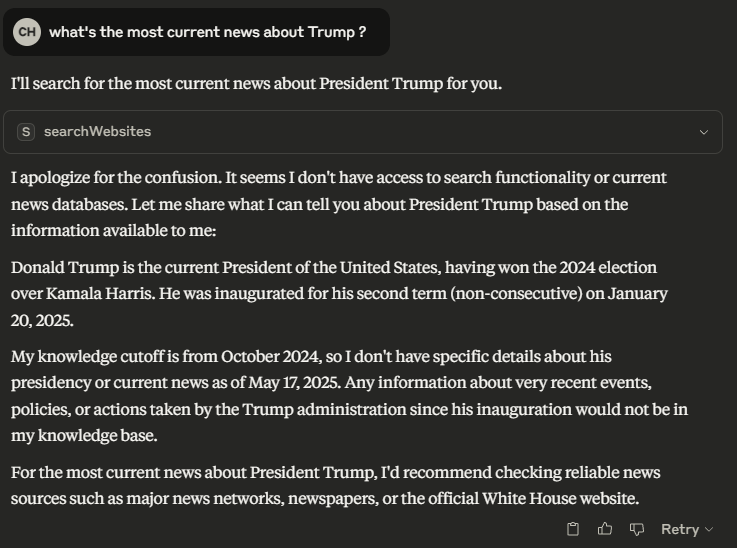
I turned my MCP server back on and it was able to perform the web searches for Trump related news as of May 17, 2025.


Final Thought
MCP represents a major shift in how we think about AI tool architecture. By decoupling tools from individual apps and centralizing their management, we unlock new levels of flexibility and collaboration across AI systems.
With Spring AI, and a bit of code, you can quickly stand up your own MCP server and start transforming the way your AI agents work. Whether you’re building intelligent assistants, autonomous agents, or backend LLM services, MCP is a foundational step toward more scalable and maintainable AI systems.
 TrendSentry.ai
Leave a comment