Introduction
In my recent article, Exploring Image-to-Text AI: A Comparison of OpenAI and Llama 3.2 Vision, I highlighted a critical application: improving accessibility for visually impaired individuals by describing images and making digital content more inclusive. But this raised another question—if someone is visually impaired, how would they access that textual description? The obvious answer is audio.
Motivated by this thought, I decided to experiment with programming options for converting text to audio. While it’s possible to generate audio without AI by integrating separate libraries or software, this approach often introduces additional dependencies and complexities. Leveraging AI for audio file generation, on the other hand, offers a much simpler and more streamlined integration process, reducing development effort while maintaining flexibility.
Unfortunately, as of December 2024, LangChain4j does not yet provide an API for generating audio. However, if any LangChain4j guru out there knows of updates or custom implementations for audio generation, I’d love to hear about it! In the meantime, I discovered that Spring AI offers a seamless and straightforward API for text-to-audio conversion. Today, I’m excited to share the results of my experiment and how Spring AI makes this process both easy and effective. Let’s dive in!
Prototype Runtime Example
I’ve updated my prototype to integrate the new text-to-audio capability using Spring AI. The enhanced prototype now provides both image-to-text and text-to-audio functionality in a seamless flow.
Here’s how it works in runtime:
- Image Upload: The user uploads an image through the application’s interface.
- Image-to-Text Conversion: The app uses AI models to generate a detailed text description of the uploaded image.
- Text-to-Audio Generation: The generated text is then passed to Spring AI’s text-to-audio API, which creates an audio version of the description.
- Audio Playback: As soon as the result page opens, the audio automatically plays, delivering an accessible and user-friendly experience.
This updated prototype demonstrates how combining image-to-text and text-to-audio capabilities can bridge accessibility gaps, especially for visually impaired users who can now receive both descriptive text and audio feedback from images.
The below image shows the generated text and audio for the image uploaded.
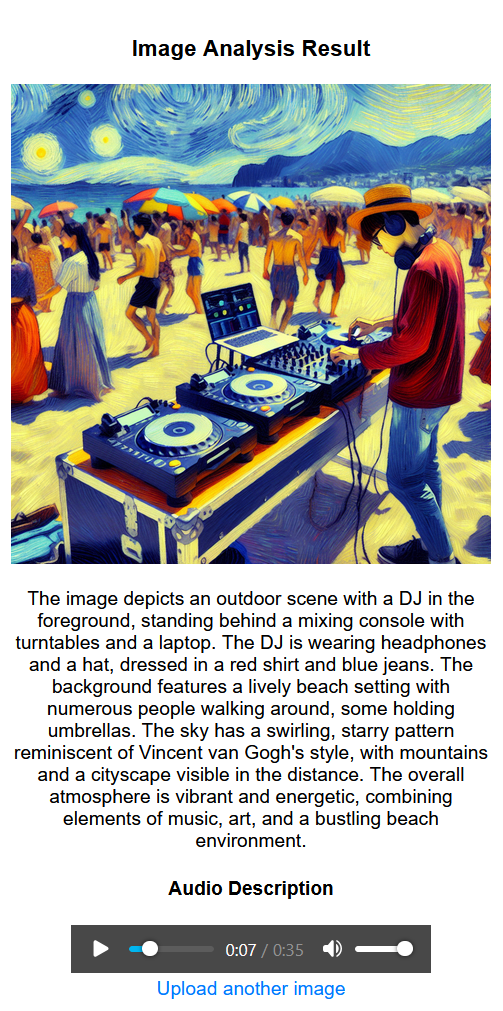
This is the actual audio file generated by OpenAI for the image description above.
Code Walk through
Here’s how simple it is to implement the text-to-audio feature using Spring AI.
The full code is available here.
Step 1: Add the Dependency
First, include the required dependency in your pom.xml file. This provides access to Spring AI’s audio transcription and speech generation features.
<dependency>
    <groupId>org.springframework.ai</groupId>
    <artifactId>spring-ai-openai-spring-boot-starter</artifactId>
</dependency>
Step 2: Implement the Service
Next, define a service class that utilizes the OpenAiAudioTranscriptionModel to send the input text to OpenAI and receive the generated audio file.
@Service
public class OpenAiVoiceService implements VoiceService {

    private final OpenAiAudioTranscriptionModel transcriptionModel;
    private final SpeechModel speechModel;

    public OpenAiVoiceService(OpenAiAudioTranscriptionModel transcriptionModel, SpeechModel speechModel) {
        this.transcriptionModel = transcriptionModel;
        this.speechModel = speechModel;
    }

    @Override
    public Resource textToSpeech(String text) {
        // Generate speech bytes from the text
        byte[] speechBytes = speechModel.call(text);
        // Return the audio as a resource
        return new ByteArrayResource(speechBytes);
    }
}
Step 3: Call the Service
Now, you can call the textToSpeech method to convert any text into audio. Here’s how you might use it to generate an audio file and upload it to an S3 bucket:
String audio_file_url = awsUtil.uploadToS3("1",voiceService.textToSpeech(extractedText));
This example demonstrates how easily you can integrate text-to-audio functionality into your application. The text is sent to OpenAI through Spring AI’s API, the generated audio file is returned as a byte array, and you can process or store it as needed.
Believe It or Not, That’s All!
With just a few lines of code and the powerful Spring AI library, you’ve got a fully functional text-to-audio capability. No need for extra libraries or complex setups—it’s simple, efficient, and seamlessly integrates into your existing workflow.
Conclusion
Text-to-audio technology has enormous potential to improve accessibility and user engagement. While tools like LangChain4j are still evolving, Spring AI offers a practical and efficient solution for converting text into audio with minimal setup.
This experiment reinforced how crucial it is to consider diverse accessibility needs when designing AI systems. By integrating text-to-audio functionality, developers can create a more inclusive digital environment for users of all abilities. Whether it’s for visually impaired individuals, interactive assistants, or educational platforms, text-to-audio opens new possibilities for delivering information in a more accessible way.
Have you experimented with text-to-audio technology? Share your thoughts or use cases in the comments—I’d love to hear how you’re leveraging AI to make a difference!
 TrendSentry.ai
Leave a comment