Quick Take
Introduction
Since the Llama 3.2 Vision was published in Sept, I wondered how it would work locally within the Ollama platform for the Image-to-Text capability. I was curious about how it would work compared with Open AI. Today, I want to share the results of this experiment with you and where these technologies might take us in the future. Let’s dive in!
What is Image-to-Text?
Image-to-text AI is all about translating visual information into words. Imagine showing a picture to someone and having them describe what they see—that’s essentially what these systems do, but with incredible speed and precision. They look at an image, identify key elements like objects, scenes, or text, and then piece it together into a meaningful description. It’s a fascinating blend of computer vision and language understanding working seamlessly to make sense of the visual world.
Why Does It Matter?
Think about the countless ways this technology is already making a difference:
- Accessibility: It helps visually impaired people by describing images, making digital content more inclusive.
- Productivity: E-commerce platforms use it to automatically tag and describe products.
- Healthcare: Medical professionals analyze scans and X-rays more efficiently.
The possibilities are endless, and models like Ollama/Llama 3.2 Vision and OpenAI are at the forefront of this revolution.
OpenAI vs. Local AI: Power, Privacy, and Personalization in Image-to-Text
We all know how powerful OpenAI models are when it comes to image-to-text capabilities. OpenAI’s models excel in delivering highly accurate, contextually relevant, and well-structured descriptions of images. These tools are integrated into cloud-based ecosystems, making them widely accessible and easy to use for developers and businesses alike. Whether it’s for accessibility tools, automated content tagging, or e-commerce applications, OpenAI has set a high bar for what image-to-text technology can achieve. The sheer scale and versatility of their models make them a go-to choice for many.
However, there’s a growing recognition of the advantages that local AI models bring to the table, especially in personal and private contexts. Unlike cloud-based solutions, local AI models like Ollama/Llama 3.2 Vision allow users to process images entirely on their own infrastructure. This can be a game-changer for individuals and organizations concerned about data privacy and security. By keeping sensitive information off the cloud, local AI ensures that image data remains confidential, reducing the risk of breaches or unauthorized access.
Local AI models also shine in scenarios where internet connectivity is limited or unavailable. In remote or secure environments—such as defense, healthcare, or research facilities—local image-to-text processing enables seamless operation without relying on external servers. Additionally, the ability to fine-tune and customize these models for specific use cases gives them an edge in tailored applications, such as analyzing medical scans, interpreting proprietary documents, or identifying specialized objects. These advantages make local AI not just a viable alternative but, in many cases, the preferred solution for image-to-text tasks.
Real Examples with Prototype Codes
I tested both models using the same image and the same simple prompt: “What do you see? Give me a detailed description.” The goal was to see how each model interprets the same visual input and how detailed and accurate their descriptions could be. Below is the image I used for this experiment.

To make the experiment easier and more interactive, I developed a small prototype with a simple user interface. The prototype allows you to select an image and ask the models to analyze it based on a given prompt. Below is a snapshot of the UI I created for this experiment.
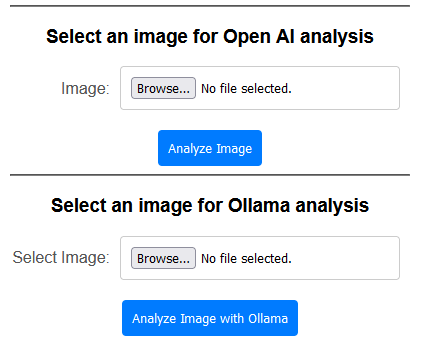
Here are the results from the Image-to-Text analysis conducted by each model.

Overall Comparison
| Feature | OpenAI/GPT-4 Vision | Ollama/Llama 3.2 Vision |
| Detail Level | Moderate, focuses on key elements concisely | High, with specific details about the drone and scene |
| Contextual Depth | Straightforward and factual | Rich, interpretative, and atmospheric |
| Drone Description | General (hovering above greenery) | Detailed (position, orientation, propellers, motion) |
| Tone | Neutral and factual | Engaging and narrative |
| Background Coverage | General description of skyline and buildings | Strong emphasis on specific landmarks |
Code Examples
The full code example is available here.
The main tools used for the prototype are LangChain4j and Spring Boot.
The below show codes to call OpenAI/GPT4o for the Image-to-Text.
@PostMapping("/analyzeImage")
public String analyzeImage(@RequestParam("image") MultipartFile image, Model model) {
    if (image.isEmpty()) {
        model.addAttribute("error", "Please upload an image.");
        return "index";
    }

    try {
        // Convert the uploaded file to a base64-encoded data URL
        byte[] imageBytes = image.getBytes();
        String base64Image = Base64.getEncoder().encodeToString(imageBytes);
        String dataUrl = "data:image/png;base64," + base64Image;

        // Create the OpenAI model
        ChatLanguageModel chatModel = OpenAiChatModel.builder()
                .apiKey(openaiApiKey)
                .modelName("gpt-4o") //gpt-4-turbo-2024-04-09")
                .maxTokens(500)
                .build();

        // Create the user message with the image
        UserMessage userMessage = UserMessage.from(
                TextContent.from("What do you see? give me a description in detail"),
                ImageContent.from(dataUrl)
        );

        // Generate the response
        Response<AiMessage> response = chatModel.generate(userMessage);
        String extractedText = response.content().text();

        // Add the extracted text to the model
        model.addAttribute("imageAnalysis", extractedText);

    } catch (IOException e) {
        log.error("Error processing the uploaded image", e);
        model.addAttribute("error", "An error occurred while processing the image.");
    }

    return "imageanalysis";
}
The below show codes to call Ollama/Llama 3.2 Vision for the Image-To-Text.
@PostMapping("/analyzeImage2")
public String analyzeImage2(@RequestParam("ollamaImage") MultipartFile ollamaImage, Model model) {
    if (ollamaImage.isEmpty()) {
        model.addAttribute("error", "Please upload an image.");
        return "index";
    }

    try {
        // Read the image file
        byte[] imageBytes = ollamaImage.getBytes();
        String base64Image = Base64.getEncoder().encodeToString(imageBytes);
        String mimeType = ollamaImage.getContentType();

        // Connect to Ollama model
        ChatLanguageModel chatModel = OllamaChatModel.builder()
                .baseUrl(OLLAMA_HOST)
                .modelName(MODEL_NAME)
                .build();

        // Create the user message with the image
        UserMessage userMessage = UserMessage.from(
                TextContent.from("What do you see? give me a description in detail"),
                ImageContent.from(base64Image, mimeType)
        );

        // Generate the response
        Response<AiMessage> response = chatModel.generate(userMessage);
        String extractedText = response.content().text();
        log.info("Extracted text: {}", extractedText);

        // Add the extracted text to the model
        model.addAttribute("imageAnalysis", extractedText);

    } catch (IOException e) {
        log.error("Error processing the uploaded image", e);
        model.addAttribute("error", "An error occurred while processing the image.");
    }

    return "imageanalysis";
}
Conclusion
Image-to-text AI is still evolving, and the potential is enormous. Imagine using this technology for:
- Virtual Reality: Providing real-time descriptions in immersive environments.
- Education: Making visual learning materials accessible to everyone.
- Smart Assistants: Enhancing tools like Alexa or Siri to understand and describe images.
- Private Data Applications: Handling sensitive information, such as personal financial documents or bank statements, where local AI offers privacy by keeping data entirely on personal or organizational infrastructure.
Final Thoughts
AI is learning to “see” the world—and it’s doing a pretty good job. Local AI options, like Llama 3.2 Vision, provide compelling solutions for private, secure, and customizable applications, while public AI, like OpenAI, offers accessibility and versatility for broader use cases. As these tools improve, they’ll unlock even more opportunities to bridge the gap between humans and machines. Whether you’re a developer, a business owner, or simply curious, there’s no better time to start exploring what image-to-text AI can do.I can do.
 TrendSentry.ai
Leave a comment