
Introduction
This weekend, I had some fun playing around with two interesting tools: Spring AI and Ollama. It felt like discovering a new toy! Along the way, I found two things that really stood out. First, Spring AI made it extremely easy to get things up and running. Second, tinkering with Ollama’s local AI platform wasn’t just fun—it was a great reminder of why running AI locally is so important. I’ve always known the benefits, but this hands-on experience gave me another chance to really appreciate its significance.
Before jumping into the details of how I worked with Spring AI, let’s take a quick moment to talk about why local AI platforms like Ollama are such a cool concept. Beyond just being fun to experiment with, they bring big benefits like enhanced privacy, better control, and the ability to switch models seamlessly. It’s worth appreciating these perks before diving into the technical stuff!
Local AI Platform Benefits
Flexibility and Dynamic Model Switching
Local AI platforms like Ollama and LM Studio simplify deployment and offer a key advantage: dynamic model switching. Developers can easily switch models by passing a model name as a parameter, while the interface to the underlying model remains unchanged. This flexibility enhances usability, speeds up development, and allows for seamless experimentation without the need to adjust application logic. It’s a perfect combination of control and efficiency, making local AI platforms a robust choice for a wide range of projects.
Data Privacy and Security
Local AI platforms ensure that all data processing happens within your environment. This eliminates the need to transmit sensitive information over the internet. In contrast, remote platforms involve external servers, increasing the risk of breaches. For industries like healthcare or government, local AI platforms provide unmatched privacy and control.
Reduced Latency
With local platforms, all computations occur on-site. This eliminates network delays and ensures fast response times. Remote platforms rely on internet connectivity, which can cause latency issues. For real-time applications, local AI is the superior choice.
Cost Efficiency
Local platforms require upfront hardware investment. However, they save money in the long run by avoiding recurring cloud fees. They are especially cost-effective for projects with heavy or predictable usage. Remote platforms, while convenient, come with ongoing costs tied to usage.
Freedom from Vendor Lock-In
Local platforms give you full control over the tools and models you use. You can switch between models or configurations without being tied to a specific vendor. Remote platforms often lock users into their ecosystems, limiting flexibility.
Local AI Platform Challenges
Hardware Requirements
Local platforms need powerful hardware like GPUs and significant memory. This can be expensive to procure and maintain. Remote platforms handle this for you but at a cost.
Scalability
Scaling local platforms is challenging and may require additional infrastructure. Remote platforms scale dynamically in the cloud, which is easier but comes with usage fees.
Spring AI Code Example
You can see the full code example in here
Configuring your application to work with any AI model running on Ollama is incredibly straightforward. Essentially, you only need two key components: an application.properties file to define your configuration and an OllamaChatModel object to integrate the desired model. With these two elements in place, you can dynamically switch between models while keeping your application logic consistent and clean. Here’s an example to demonstrate how easy it is to set up:
Property File (application.yml)
spring.application.name=ollamaexperiment
spring.ai.ollama.base-url=http://localhost:11434
spring.ai.ollama.chat.options.model=llava-llama3:latest
spring.ai.ollama.chat.options.temperature=0.7
Configuration class
@Configuration
public class AiConfig {

    @Value("${spring.ai.ollama.chat.options.model}")
    private String model;

    @Bean
    public OllamaChatModel chatModel() {

        var ollamaApi = new OllamaApi();

        return new OllamaChatModel(ollamaApi,
                OllamaOptions.create()
                        .withModel(model)
                        .withTemperature(0.9));
    }
}
1. Configuration Property: The `model` is loaded from `application.properties` (e.g., `spring.ai.ollama.chat.options.model=llava-llama3:latest`).
2. Options Setup: Temperature and model are configured via `OllamaOptions`.
3. Chat Model: An `OllamaChatModel` is created with the API client and options.
4. Spring Context: The `OllamaChatModel` bean is registered in the Spring application context, making it available for dependency injection throughout the app.
Then, simply you can call the OllamaChatModel like I did in RestController as shown below.
    private final OllamaChatModel chatModel;

    @Autowired
    public ChatController(OllamaChatModel chatModel) {
        this.chatModel = chatModel;
    }

    @GetMapping("/ai/generate")
    public Map<String,String> generate(@RequestParam(value = "message", defaultValue = "Tell me a joke") String message) {
        log.info("model:{}", this.chatModel.getDefaultOptions().getModel());
        return Map.of("generation", this.chatModel.call(message));
    }
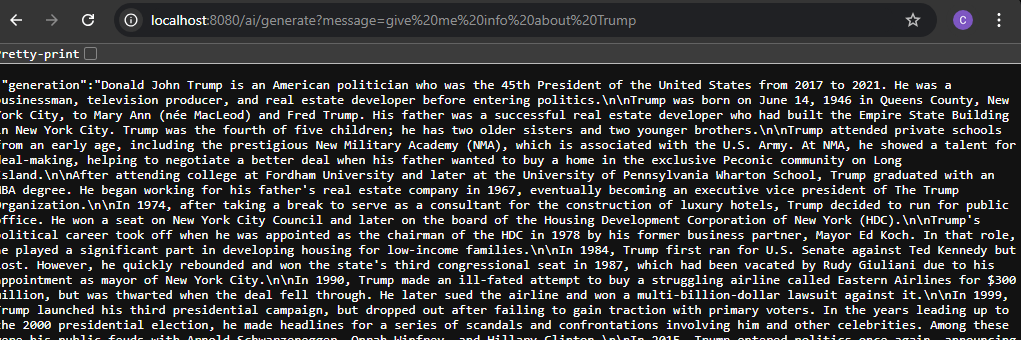
When you run the provided code example, you can easily send prompts to the AI model and receive responses in real-time. The interaction is seamless, and the output will look something like the example shown below, demonstrating the simplicity and efficiency of integrating with the platform.
Conclusion
Playing around with Spring AI and Ollama this weekend reminded me how exciting and accessible modern AI tools have become. With just a bit of configuration and a flexible approach to model integration, you can quickly set up AI-driven applications that are both fun to build and surprisingly powerful. Platforms like Ollama make the whole process even more enjoyable, showing just how practical and important local AI solutions can be—whether it’s about privacy, speed, or the freedom to switch between models with ease.
Tools like these are perfect for experimenting, learning, or even building serious projects without sacrificing control or security. Whether you’re toying with ideas over a weekend or working on production-ready AI applications, the combination of simplicity and versatility offered by Spring AI and local platforms like Ollama makes them worth exploring.
 TrendSentry.ai
Leave a comment